Skip to content

Understand the hard partsof anything you read

Highlight a confusing word, name, or equation in a textbook, paper, or lecture slide, then click Doe . A clear explanation appears right beside it, written for what you’re reading and backed by sources you can check.
Download for Mac
  • Free during early access
  • No account needed
  • macOS 14 or later
ECON 101 · Week 3 reading

Chapter 3 · Thinking at the margin

Why we finish movies we don’t enjoy

Halfway through a bad film, most of us stay in our seats. Economists have a name for that pull: the sunk cost fallacy. The ticket is paid for either way, yet walking out still feels like wasting it.

A student highlights the phrase sunk cost fallacy in an economics reading about why people finish movies they dislike.
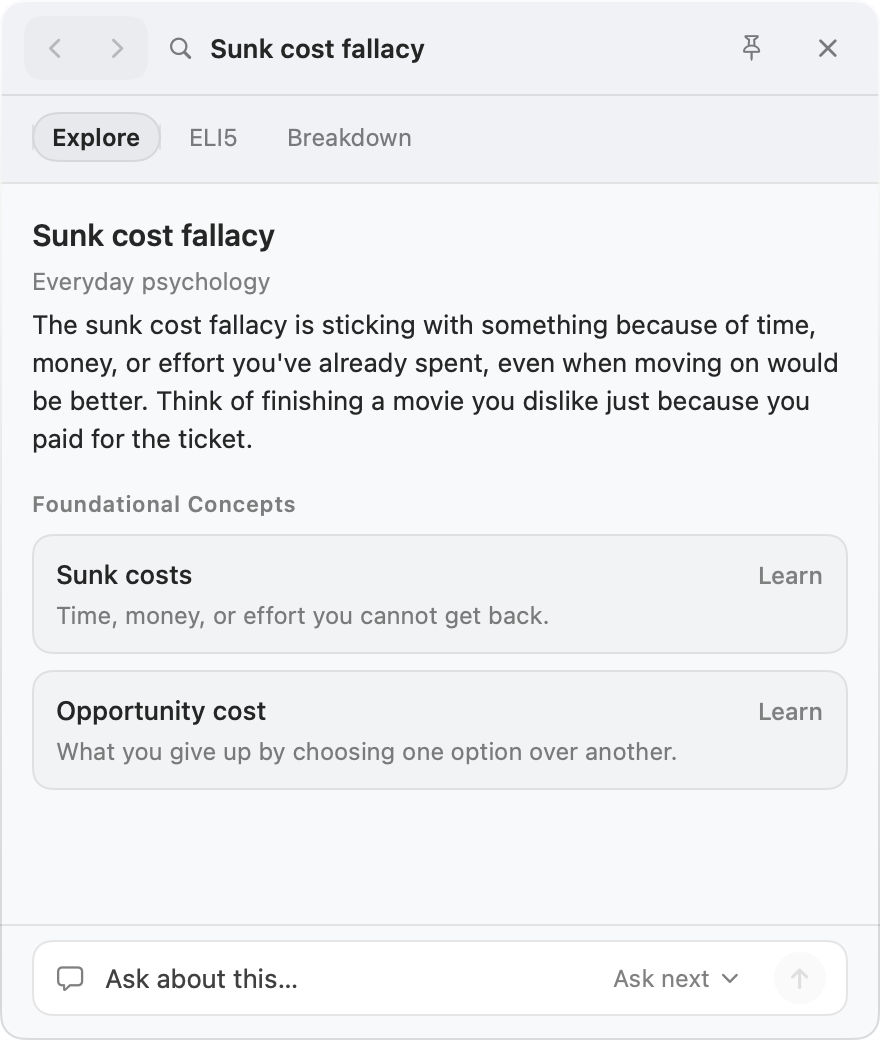
The Doe card for sunk cost fallacy, with Explore, ELI5, and Breakdown tabs, a short explanation, related ideas to learn next, and a box to ask a question.
Doe: a pixel art croissant wearing a top hat and a monocle.

Why Doe

Made for the moment a word stops you

Looking something up usually means a new tab, a page of search results, and a definition that doesn’t match your class. Doe explains it right where you are.

Explained the way your reading means it

The same word can mean different things in different classes. Doe reads the paragraph around your highlight, so you get the meaning that fits.

In an economics textbook

Depression

A long, severe drop in economic activity, deeper and longer lasting than a recession.

In a psychology reading

Depression

A mood disorder marked by lasting sadness and loss of interest that gets in the way of daily life.

Never lose your place

No new tabs, no copying into a chatbot, no explaining what class it’s for. The card opens beside your page and closes when you click away.

See where it came from

Every explanation is based on sources you can open. When a detail about a person, book, or event isn’t backed up, Doe tells you.

Built for what you study

Each topic gets the views that help most.

  • A scientist

    Marie Curie

    ContributionsLife & Context

  • An idea

    Opportunity cost

    ELI5Breakdown

  • A formula

    F = ma

    SymbolsIntuition

Keep going until it clicks

Ask a follow up question, open a related idea, or step back with ⌘[. Every lookup is saved on your Mac, so you can review them before an exam.

Keep reading. Leave with the idea, not twenty open tabs.

How it works

From stuck to sure in three steps

  1. Step 1

    Highlight what you don’t get

    A word, a name, or an equation, in a website, a PDF, or your notes. Nothing to highlight? Type a topic instead.

  2. Step 2

    Click Doe

    Doe sits on your screen as a little croissant. Prefer the keyboard? Press instead.

  3. Step 3

    Read, then keep going

    Get the idea in a few lines. Ask a follow up question, open a related idea, or click away to get back to reading.

Uses

Made for whatever you’re reading

From the first week of class to your first week at work.

  • Textbooks and course readings

    Key terms explained the way your class uses them.

    Try highlighting opportunity cost

  • Research papers

    Jargon, methods, and the people a paper cites.

    Try highlighting p value

  • Lecture slides

    Make sense of the shorthand on slides and PDFs from class.

    Try highlighting ATP synthase

  • Math and science

    What each symbol in a formula means, and why it works.

    Try highlighting PV = nRT

  • News and long reads

    Background on unfamiliar names, places, and events.

    Try highlighting Treaty of Versailles

  • Internships and new jobs

    Get up to speed on the terms of a field that’s new to you.

    Try highlighting EBITDA

FAQ

Questions, answered

Want to see what changed in the latest version? Every update has notes on the releases page.

See what’s new

How much does it cost?

Doe is free during early access. You don’t need an account or a credit card to use it.

How is this different from ChatGPT?

You don’t have to copy, paste, or explain what you’re reading. Doe sees the paragraph around your highlight, looks up sources on the web, and explains the term the way that page uses it, in a small card beside your reading.

Can I trust the explanations?

Each explanation is based on sources found for that topic, and you can open them from the card. For people, books, and events, Doe also lists any details the sources don’t back up. AI can still make mistakes, so check anything important before you rely on it.

Is it okay to use for school?

Doe explains what you’re reading. It isn’t built to write essays or solve assignments for you. Check your course’s rules on AI tools, and cite the original sources rather than the card.

Where does it work?

Almost anywhere you can highlight text on your Mac: websites in Safari or Chrome, PDFs in Preview, Notes, and most document apps. If nothing is highlighted, you can type a topic instead.

Does it explain math and equations?

Yes. Highlight a formula to see it written out clearly, what each symbol means, and the intuition behind it. It reads equations on many websites. If it can’t read one reliably, it tells you instead of guessing.

Why is there a croissant on my screen?

Doe: a pixel art croissant wearing a top hat and a monocle.

That’s Doe. Highlight something and click the croissant, and the explanation opens right next to it. Drag it anywhere you like. If you’d rather keep your screen clear, choose Hide Doe from the menu bar and press ⇧⌘L instead.

Why does it ask for Accessibility permission?

That’s the Mac setting that lets an app see what you’ve highlighted in other apps. Doe only looks when you ask it to, by clicking the croissant or pressing ⇧⌘L. You can still type a topic without it.

What happens to the text I highlight?

To write the explanation, your highlight and a little of the text around it are sent to the AI service that writes the card, and the term is used for a web search. Nothing is tied to an account. Your history stays on your Mac, and the surrounding text is never saved.

Which AI writes the explanations?

Google’s Gemini, by default. If you already have an account with OpenAI, Groq, Cerebras, or Inception, you can connect it in Settings instead.

Which Macs does it work on?

Any Mac running macOS 14 Sonoma or later, with an Apple or Intel chip. To check yours, open the Apple menu and choose About This Mac. You’ll need an internet connection, and the app keeps itself up to date.

Doe, waving you in.

Try it on your next reading

Free during early access. No account needed. To remove it, drag it to the Trash.

Download for Mac

Version 1.4.0 · macOS 14 or later